Six Things That Actually Change Your iPhone Trade-In Value in Sydney, and Three That Do Not
iPhone trade-in value depends on model, storage, screen, body, battery and lock status, in that order. Check each one before requesting a Sydney quote.
If you have ever wondered why your mate got $600 for an older iPhone while you were offered $350 for one that looks almost new, the answer is probably not luck. Most Sydney sellers misprice their own phone because they focus on the wrong details. When you are trying to get a fair iPhone trade-in value, what matters is not how shiny the colour is or whether you kept the box. It is a short, ordered list of things a buyer can inspect: model and storage first, then screen and body condition, then battery health, then lock status. This guide walks through that order step by step. We will look at why most Sydney sellers misprice their own iPhone and why the order matters more than the list itself. Then we will cover each factor, from model and generation to Apple ID lock status. We will also cover the three things sellers over-worry about: colour, the original box, and a scuffed case. You will learn how to check your iPhone before asking for a quote, see a Sydney example of preparing a phone for pickup, and understand why the order is what stops the guesswork.
Why Most Sydney Sellers Misprice Their Own iPhone
Most Sydney sellers start with what they can see: the colour, the case, the box in a drawer. Buyers start with the model number. An iPhone trade-in value comes down to a short, ordered list of inspectable attributes, and the order is what sellers misrank most. In our experience buying iPhones across Sydney, that sequence runs model and storage first, then screen and body condition, then battery health, then lock status. Misranking costs you twice. You accept a lowball because an older-looking phone feels worthless, or you over-promise before inspection and lose your negotiating position when the quote is revised. This guide gives you the ranking, three factors to stop worrying about, and a checklist before you request an iPhone trade-in estimate. Handing your iPhone over in person vs posting it affects how firm the final number is.
The Order Matters More Than the List Itself
Here is the mental model: some factors are gates, others are dials. Model and lock status can end a deal outright; screen, body and battery health only move the number within a range.
That is why sequence beats memorising a list. Lock status, covered last, is the only factor that can end a deal outright rather than adjust the number. In our experience, quotes vary between buyers and can shift week to week, so treat any single figure with caution. The assessment order stays steady in our buying experience.
Accurate self-assessment before inspection earns a cleaner, faster iPhone trade-in estimate and fewer revised quotes. We don't publish fixed price tables, because a real estimate comes from inspecting your device. Questions are welcome before that. Use the ranking below to know what a buyer checks, not to guess a number.
Number 1: Model and Generation Set the Ceiling
Now the ceiling. Buyers identify the exact model before anything else. An iPhone 13 and an iPhone 11 sit in different tiers; a flawless 13 and a marked one sit closer. Find yours at Settings > General > About. Note the model name and model number, because the number confirms generation and region. Pro and Pro Max models hold value better than the standard model from the same year in the local market. Older models do not fall to zero. A worn but working, unlocked iPhone can still carry trade-in value, and that is the lowball trap for sellers who rank cosmetics first. Get the model right first. It sets the ceiling every other factor works within. Nothing done to a screen or battery lifts a phone above its model tier.
Number 2: Storage Capacity Comes Second
Two iPhone 13s from the same year are not the same phone to a buyer if one is 128GB and the other 256GB. Buyers price them separately, because unlike RAM in a laptop, iPhone storage is set at manufacture. That is why it gets asked about so early.
Check Settings > General > About > Capacity. That figure is total capacity, not your free space. Photos, apps and messages fill the free space, but they don't change what the phone is.
In our experience, the pricing gap between tiers is real, though narrower than the gap between models, which is why storage sits second, not first.
Number 3: Screen Condition, Cracks and Dead Spots
Once model and storage are settled, the screen is the most visible thing reducing your iPhone trade-in value. Cracks, chips, deep scratches and hidden damage all matter. Inspect on a white image, then a black one. Dead pixels, dark patches and edge discolouration appear differently. Run a finger along all edges and corners. Intermittent or dead touch zones cost more than a hairline scratch near the bezel. Signs of a previous replacement: uneven brightness, a raised edge, or a display proud of the frame. A replaced screen changes how a buyer prices your phone. A protector that absorbed the damage is a positive, not a penalty. Peel it off before inspection to see and describe what is underneath.
Number 4: Body Condition and Repair History
Frame dents, bent corners and cracked back glass cost more than everyday scuffing. Buyers separate structural damage from cosmetic wear.
Water exposure is the quiet factor: internal corrosion can matter more than anything visible. Moisture indicators only tell part of that story.
Repair history counts. A documented, genuine repair is easier to price than an unknown third-party fix, and undisclosed work tends to surface during inspection. Test forgotten parts: camera lenses, speakers, buttons, charging port and Face ID. A working phone in a marked body beats a pristine shell with dead hardware.
If a repair is on the table, our guide to whether repairing your damaged iPhone pays for itself helps you decide. Above all, be upfront about prior repairs. Over-promising before inspection is the fastest way to have an agreed iPhone trade-in value revised down on the spot.
Number 5: Battery Health Matters, but It Rarely Sinks a Quote
After body condition and repair history, the next factor is battery health. It lives at Settings > Battery > Battery Health and Charging. Buyers read the maximum capacity percentage, not how long the phone lasts your working day. In our buying experience, a low figure usually adjusts the iPhone trade-in estimate rather than killing it, which is why it ranks below screen and body condition. A Service message, or swelling like a lifted screen or bulging frame, is more serious than any percentage. Third-party batteries can muddle an estimate because health data may not read properly. If battery is your phone's weak point, say so before inspection. A known weakness is easy to price; a surprise mid-assessment is not.
Number 6: Lock Status and Apple ID Are Deal Breakers
Battery health adjusts a quote; lock status can cancel one. Your iPhone must be signed out of its Apple ID with Find My off, so Activation Lock is gone. A locked handset cannot be resold by a buyer, which means it has no trade-in value to us. Confirm the phone boots to the setup screen after erasing, that screen is proof the lock is actually removed. Check the IMEI is clean and not reported lost or stolen, because we verify IMEI as part of our standard assessment. Remove your SIM or eSIM plan and note the IMEI for your records. Lock status ranks last only because it is binary. Once unlocked and clean, the rest of the list does the pricing.
Colour Choices Do Not Move the Number
With lock status sorted, you can stop worrying about the finish. Colour is the classic factor Sydney sellers rank far too highly. In our buying experience it changes the estimate very little, and often not at all. A discontinued or unusual colour might be a talking point in a private sale, but it rarely lifts a trade-in figure, because buyers price the spec and the condition. Resale demand follows model, storage and condition, not the shade. So don't pay for a colour-specific repair, a matching case or a cosmetic touch-up to lift a quote. That money is unlikely to come back. Put the effort into a clean screen, honest condition notes and a phone already signed out of its Apple ID.
The Original Box Is Nice to Have, Not Valuable
The same logic applies to the original box still sitting in your cupboard. Paperwork and packaging can make a private listing feel tidier, but in our experience as a local buyer they are not a value driver. The phone is the product, and nothing about a missing box makes it less functional or less resellable. In our experience, a charger and cable are more useful to a buyer than an empty box, and even those rarely shift an estimate. So keep the box if you are selling privately and want the listing to look complete. Skip the hunt if you just want a quote on an unused device. Most importantly, do not let a missing box stall your decision for weeks. The model ages while you search the garage, and the iPhone trade-in value drifts in the meantime.
A Scuffed Case Is Not a Scuffed Phone
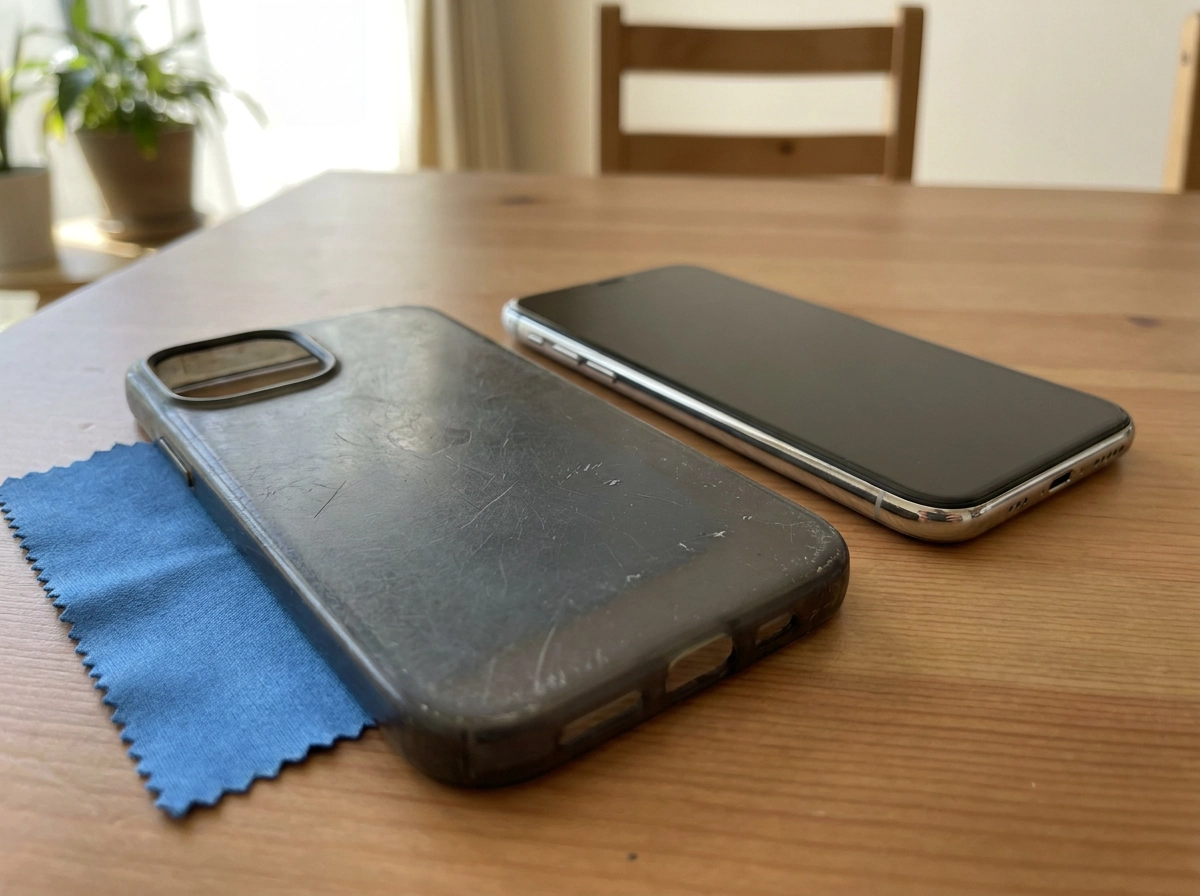
A scuffed case has done its job. The phone underneath is usually in better shape than the case suggests. Sellers often assume case damage means phone damage, then talk their own price down before a buyer has seen anything.
Take the case off and check the frame, back glass, camera surrounds and corners. Describe those, not the accessory. In our inspection experience, we regularly find tempered glass concealing a cracked screen beneath it, remove it and check the real display before describing condition.
Do not spend money on cosmetic fixes a buyer will not price. Honest notes about what you can actually see are worth more than a rushed polish.
How to Check Your iPhone Before You Ask for a Quote
With the case off, run this check before requesting any quote.
Model. Settings > General > About. Note the model name, model number and capacity exactly as shown.
Screen and body. Check a white then black background, then inspect edges, back glass, camera lenses and buttons in daylight.
Battery. Under Settings > Battery > Battery Health, record maximum capacity and any Service message so you can mention it upfront.
Lock status. Sign out of Apple ID, turn off Find My, erase all content and settings, and confirm the setup screen appears. Make sure to back up via iCloud or a computer and confirm it completed before erasing, once the phone is wiped without a backup, that data cannot be recovered.
Condition note. Write two lines covering scratches, dents and battery percentage. Accurate notes bring a smoother inspection and a more predictable outcome.
That checklist is what keeps your quote predictable.
A Sydney Example: Preparing a Phone for Pickup
Say you're in Parramatta, upgrading from an older iPhone with a small screen chip and a battery showing reduced capacity. Run the ranking that sets iPhone trade-in value: model sets the range, storage confirms the tier, the chip and body wear describe condition, battery adjusts it slightly, and lock status confirms it can be resold. What lifts your outcome is honesty about the chip and battery, a phone already signed out of its Apple ID, and skipping colour, the original box and the scuffed case. Before pickup, charge it, remove the case and protector, and note the IMEI. The same steps apply regardless of suburb; only the numbers shift, not the ranking. When your notes are ready, request a quote.
The Order Is What Stops the Guesswork
Same phone, same steps, same order. Value comes from that sequence, not anecdotes: model, storage, screen, body, battery, lock status. Work down it before you consider any figure.
If a quote arrives without anyone asking your model or lock status, ask why. Those two factors decide whether a trade-in value iPhone buyers offer is possible at all.
The three non-factors covered above, colour, the original box, a scuffed case, do not appear in that sequence for a reason.
The checklist in the section above covers the exact steps. When your checklist is done and your condition notes are accurate, request a quote and let the inspection confirm the details.
Conclusion
The order is the advantage: run the checklist, note your condition honestly, and request a quote knowing you have priced the right things. You have done the work. Now get the figure your iPhone has earned.